
Choosing a GPU and quantization when the H200 is unavailable
Choosing a GPU and quantization when the H200 is unavailable
Reading time: approx. 9 minutes. Cluster: on-prem AI. Author: Fryderyk.
The answer first
If you want to run a 70B-class open-weight model in-house and the H200 has a multi-month lead time, the decision is not about waiting for the best card. It is about matching the model's precision to the memory of the card you can actually buy this quarter. Quantization here is a lever, not a last-resort compromise: it is what decides whether a 70B model drops from two cards to one and whether it fits on hardware that is in stock.
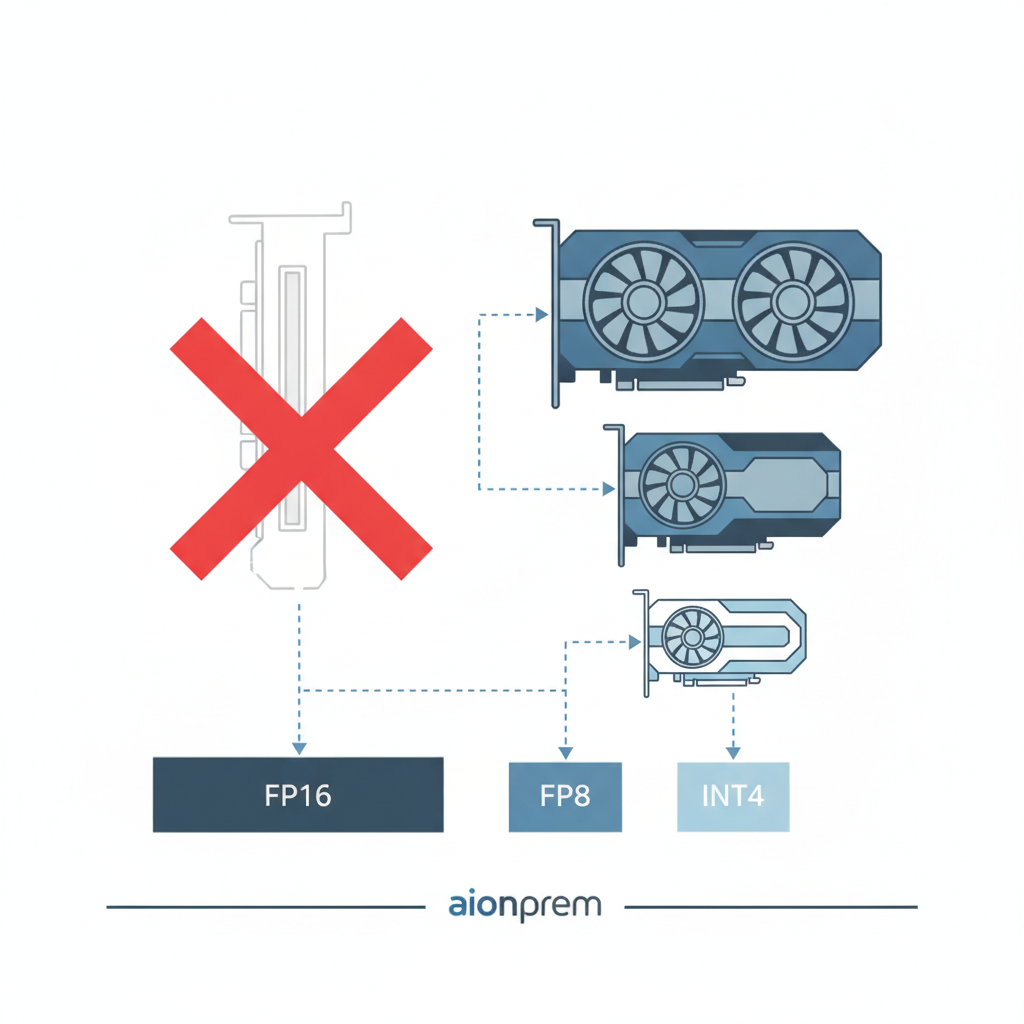
In short. A 70B model in BF16 weighs about 140 GB in raw weights, so it needs two 80 GB cards linked over NVLink. Quantizing to FP8 cuts that to about 70 GB and fits the model on a single 80 GB card, but FP8 is only accelerated natively on Hopper and Ada, not on Ampere. Weight-only quantization to INT4, in the AWQ or GPTQ schemes, drops to about 35 GB and lets you run 70B even on a single 48 GB card, at the cost of a measurable but usually small drop in quality. When the H200 is out of reach, the realistic path is most often an H100 80 GB with FP8, an A100 80 GB with weight-only quantization, or an L40S 48 GB with INT4 for lighter load.
The takeaway: you pick the card for what is available, and you pick the precision for the card. That order, not the reverse. Below I break down how much memory the model eats at each precision, what it fits on after quantization, and what you pay for every step down.
Table of contents
- Why this is a question of availability, not a card ranking
- How much memory a 70B model really eats
- Table: VRAM needs per precision
- Quantization: what FP8 does and what INT4 does
- A card instead of the H200: what you can actually buy
- Table: cards and what 70B fits on
- What you pay for each step down
- A four-step decision path
- What this note does not replace
- FAQ
- Disclosure and biases
- What I do not cover here
- Related notes
Why this is a question of availability, not a card ranking
Through 2026, accelerator availability stopped being background to the decision and became its main constraint. The strongest cards go first to large contracts, and export policy shifts allocation between markets on top of that: when in mid-July the United States eased its rules and allowed H200 shipments to China under an added duty, part of the supply that could have reached other markets was steered toward where demand is largest. For a mid-sized European plant this means one thing: a top-shelf card is often not available on demand, and the rollout still has to close this quarter.
That changes the nature of the question. "Which card is best for 70B inference" has a known answer, and I covered it from the numbers side in a benchmark note. But the question that actually comes up in a purchasing meeting is different: "what do I run this model on, given the H200 arrives in a few months at the earliest." That is a question about matching the model to available hardware, not about picking the top of the table. Quantization is the tool that makes the match possible, because it brings the required memory down far enough that the model fits on a card you can really buy.
The market event is evidence here, not the topic. I bring up export controls to show why planning around one specific card is fragile, not to comment on trade policy. The architectural conclusion is independent of where the next regulatory decisions go: the rollout should tolerate a card swap, and that means designing it around precision and memory, not around one accelerator model.
How much memory a 70B model really eats
A card's memory has to hold three things at once, not just the model weights. First, the weights: parameter count times bytes per parameter, which depends on precision. Second, the key-value cache, KV cache for short, which grows with context length and the number of concurrent requests. Third, a buffer for activations and inference-server overhead. Anyone who counts only the weights understates the requirement and picks a card the model will load onto but crash on at the first longer context or higher batch.
The weights alone are simple to compute. A 70B model at two bytes per parameter, that is FP16 or BF16, is about 140 GB. In FP8, one byte per parameter, about 70 GB. In INT4, half a byte, about 35 GB. On top of that you add a real buffer for KV cache and activations, which at a sensible context and moderate concurrency can add anywhere from a low double-digit to a few tens of percent. That is why the table below lists weights separately from the estimate of memory actually needed for stable serving, because it is the second figure that decides how many cards the model needs.
Table: VRAM needs per precision
The numbers are indicative, for a 70B-class open-weight model at moderate context and batch. They show the method and orders of magnitude, not a guarantee for a specific serving stack. For your own decision, plug in your own model, context length, and concurrency profile.
| Precision | Bytes/param | Weights (~70B) | Real VRAM with KV and buffer | Fits on |
|---|---|---|---|---|
| BF16 / FP16 | 2 | approx. 140 GB | approx. 170 to 200 GB | 2x 80 GB (NVLink) |
| FP8 | 1 | approx. 70 GB | approx. 90 to 100 GB | 1x 141 GB comfortably, 1x 80 GB tight, 2x 48 GB |
| INT8 (weight-only) | 1 | approx. 70 GB | approx. 90 to 100 GB | like FP8, but without the Hopper/Ada requirement |
| INT4 (AWQ/GPTQ) | 0.5 | approx. 35 GB | approx. 45 to 55 GB | 1x 48 GB tight, 1x 80 GB comfortably |
Two things from this table. First, each step down in precision roughly halves the memory requirement, and it is that halving that decides the drop from two cards to one. Second, "fits" is not the same as "fits comfortably": FP8 on a single 80 GB card leaves little room for KV cache, so at a longer context or higher concurrency you will still need a second card or a step down to INT4.
Quantization: what FP8 does and what INT4 does
Quantization means storing the model with fewer bits per parameter. Fewer bits mean less memory and, for inference bound by memory bandwidth, also faster generation, because each layer is read from memory faster. The price is a loss of storage precision that translates into answer quality. The key point is that different schemes pay that price at very different rates.
FP8 is an eight-bit floating-point format. It keeps a dynamic range close to FP16, so the quality loss is usually at the edge of measurability while the speedup is real. The catch is hardware: native FP8 support arrived only with Hopper, that is H100 and H200, and Ada, that is L40S and RTX 6000 Ada. On the older Ampere, that is A100 and A10, FP8 has no hardware acceleration, so there you reach for weight-only quantization instead.
INT4 in the AWQ or GPTQ schemes is weight-only quantization: only the weights are compressed to four bits, while the compute still runs at higher precision after dequantization. It is the strongest memory lever, because it cuts the weights to a quarter of the FP16 size and lets you fit 70B on a single 48 GB card. The quality cost is higher than with FP8 and, more importantly, task-dependent: on some tasks the drop is barely noticeable, on others, especially those requiring precise reasoning over a long context, it can be felt. That is why INT4 always has to be measured on your own task, not taken on faith from someone else's benchmark.
A card instead of the H200: what you can actually buy
When the H200 is off the table on availability grounds, the sensible alternatives form a short list, and each has a different profile of memory, bandwidth, and precision support. The point is not to pick the "second best" card in isolation, but to match a card-plus-precision pair to the model that has to run.
The H100 80 GB is the closest substitute: the same Hopper as the H200, native FP8, only 80 GB instead of 141 GB and a narrower memory bandwidth. It usually has a shorter lead time than the H200, because it has been on the market longer and more units circulate. The A100 80 GB is the most widely available, including on the secondary market, but it is Ampere: no native FP8 and clearly slower bandwidth, so on 70B you work with weight-only INT8 or INT4 quantization and accept lower throughput. The L40S 48 GB and the related RTX 6000 Ada 48 GB are Ada cards with FP8, but without NVLink and with GDDR6 memory at far lower bandwidth than the HBM in data-center cards; they suit 70B in INT4 under moderate load, or smaller models, and scale poorly in a multi-card setup because there is no fast link between cards.
Below I lay these options out. The "main trade-off" column is the important one here, because it, not the memory figure alone, decides whether a given card fits your traffic profile.
Table: cards and what 70B fits on
Bandwidth and memory figures are indicative, based on public specifications from 2026. The "70B fits as" configuration assumes moderate context and batch; under aggressive load each of these options has to be re-checked with your own benchmark.
| Card | VRAM | Memory bandwidth | Native FP8 | 70B fits as | Main trade-off |
|---|---|---|---|---|---|
| H100 80 GB | 80 GB | approx. 3.35 TB/s | yes (Hopper) | FP8 on 1x (tight), BF16 on 2x | still hard to source, but shorter lead time than H200 |
| A100 80 GB | 80 GB | approx. 2.0 TB/s | no (Ampere) | INT8/INT4 on 1x, BF16 on 2x | no FP8, slower bandwidth, but wide availability |
| L40S 48 GB | 48 GB | approx. 0.86 TB/s | yes (Ada) | INT4 on 1x, FP8 on 2x | no NVLink, low bandwidth, scales poorly across cards |
| RTX 6000 Ada 48 GB | 48 GB | approx. 0.96 TB/s | yes (Ada) | INT4 on 1x | workstation card, no NVLink |
The reading is practical. If you want quality close to full precision and have steady traffic, aim for an H100 with FP8 or a pair of A100s. If budget and availability push you to 48 GB, a 70B model can only run there in INT4, so plan a quality measurement on your own task right away, before you close the decision.
What you pay for each step down
Every step down, whether lower precision or a weaker card, has a price, and it is worth naming it out loud so no one discovers it after the purchase.
The step from FP16 to FP8 usually costs the least: the quality loss is at the edge of measurability, and in return you get half the memory and faster generation. It is the cheapest lever and usually the first move, provided the card supports FP8 natively. The step from FP8 to INT4 costs noticeably more: you get another halving of memory and the option to drop to a single 48 GB card, but you risk a quality drop that on precise-reasoning tasks can be felt. It is a lever you pull deliberately and after measurement, not by default.
Choosing a slower card costs you throughput, not quality. An A100 will compute exactly the same model as an H100, only slower, because it has a narrower memory bandwidth, and inference in the generation phase is bandwidth-bound. Choosing a card without NVLink, like the L40S, costs you scaling: two such cards do not combine into as efficient a pair as two data-center cards with a fast link, so a multi-card setup delivers less than the sum of memory suggests. That feeds directly into cost per million tokens and into the utilization threshold at which your own hardware starts to pay off against an API, which I broke down separately in the note on the cost of a million tokens.
A four-step decision path
Instead of starting from the card, start from the model and the traffic, and the card falls out at the end.
Step one: fix the model and the required quality. A 70B class at full precision is the reference point; if your task tolerates INT4 without a felt drop, the space of available cards widens considerably. Step two: compute the real VRAM, that is the weights at target precision plus a KV-cache buffer for your context and concurrency, not the weights alone. Step three: pick the lowest precision that holds quality on your task, and only then pick a card that is available, checking along the way whether it supports that precision natively. Step four: measure. Confirm throughput and post-quantization quality with your own benchmark on the target serving stack, because someone else's numbers are a starting point, not a verdict.
This order has one advantage that matters under uncertain supply: it tolerates a card swap. If the project stands on precision and a real memory budget rather than on one accelerator model, then changing the hardware supplier midway is a correction, not a return to square one.
What this note does not replace
This is a note about choosing a card for availability, not a full benchmark or a cost calculation. Exactly how many tokens per second you will squeeze out of each configuration I broke down from the numbers side in a separate piece on GPU sizing for Llama 3.1 70B. What a million tokens really costs on your own GPU, and at what utilization it beats an API, I computed in the note on the cost of a million tokens. The full three-year TCO of a rollout, with energy, people, and compliance, is the subject of the TCO calculator. This note is the step before those: first settle what you will run the model on at all, then compute its throughput and cost.
FAQ
Which GPU for a 70B model if I cannot get an H200?
The closest substitute is an H100 80 GB with FP8 quantization, which fits the model on a single card. If the H100 is also hard to source, a pair of A100 80 GB with weight-only quantization makes sense, or a single 48 GB card like the L40S, but then the 70B model only runs in INT4 and you have to measure quality on your own task.
How much GPU memory does a 70B model need?
The weights alone are about 140 GB in BF16, about 70 GB in FP8 or INT8, and about 35 GB in INT4. On top of that, add a buffer for KV cache and activations, which at a sensible context adds a low double-digit to a few tens of percent. That is why stable serving of 70B in BF16 needs two 80 GB cards, not one.
Does INT4 quantization ruin model quality?
It lowers it measurably, but usually only slightly, and the scale is task-dependent. On many applications the drop is barely noticeable; on tasks requiring precise reasoning over a long context it can be felt. INT4 gives the strongest memory saving, but it always has to be verified on your own task rather than accepted from someone else's benchmark.
FP8 or INT4: which to choose?
If the card supports FP8 natively, that is Hopper or Ada, start with FP8, because you pay the smallest quality cost. Reach for INT4 when you need to drop to a single 48 GB card or when you use Ampere without native FP8, and then plan a quality measurement as part of the decision, not as a formality.
Why does an A100 run slower than an H100 on the same model?
Because it has a narrower memory bandwidth, about 2.0 TB/s versus 3.35 TB/s, and inference in the token-generation phase is bound precisely by bandwidth, not by compute. An A100 will compute the same model correctly, only slower, and additionally without native FP8, so on it you use weight-only quantization.
// disclosure & biasesDisclosure and biases
I write from the perspective of someone working on an AI platform run outside the public cloud, so I have a natural tendency to show that on-prem can be stood up even when the strongest hardware is unavailable. I tried to balance that: I say plainly that stepping down to weaker cards and lower precision has a price, that INT4 can noticeably lower quality on some tasks, and that some of the options described only make sense after a measurement on your own task. The on-prem AI market has several categories of solutions, from self-assembly on open source, through productized offerings, to managed models, and each spreads the hardware-selection risk differently. All memory and bandwidth figures are indicative, based on public 2026 specifications, not on the outcome of a specific rollout. This is not purchasing or investment advice.
What I do not cover here
I do not give specific tokens per second per configuration, because that depends on the serving stack and is the subject of a separate GPU sizing piece. I do not compute cost per token or full TCO, because I run those in separate notes. I do not discuss newer-generation cards or multi-node clusters, because for a single 70B-class model they do not change the availability-driven conclusion. I do not go into the parameters of freshly released open-weight models, because without confirmed data on their size and requirements it would be guesswork; the reference point here is the 70B class. Nor do I settle export policy or its future direction, because I bring it up only as the reason it is worth designing a rollout that tolerates a card swap.
Related notes
- GPU sizing for Llama 3.1 70B inference: numbers from benchmarks
- What a million tokens costs on-prem: H100 vs H200 vs API
- AI TCO calculator: methodology, a worked example and FAQ
- Bare-metal, colocation, or appliance: where to put on-prem AI (CAPEX and OPEX)
- On-prem AI in European manufacturing 2026: a complete architecture guide
Building CortexMine, an on-prem AI platform for European manufacturers under NIS2. Where this bias could affect conclusions, it is flagged inline.
Want to apply this to your case: architecture, compliance, and cost?
→ Book 30 min
DIY, productized, or managed: three on-prem AI models and who maintains them
"On-prem AI" isn't one deployment model but at least three, with different cost, risk, and team-load profiles. We break them down so CISOs and CIOs know which conversation they're really having before the RFP.

Bare-metal, colocation, or appliance: where to put on-prem AI (CAPEX and OPEX)
Bare-metal in your own server room, colocation with dedicated hardware, or a vendor's managed appliance. Three on-prem AI deployment models for European manufacturing in 2026: CAPEX and OPEX numbers, NIS2 risk profiles, when each makes sense — and when to skip on-prem entirely.

On-prem AI in European manufacturing 2026: a complete architecture guide
Architecture, GPU sizing, security, integrations, TCO, build vs buy. A practical guide to deploying on-prem AI for CISOs and CIOs in European manufacturing in 2026.